Skip to content
Proprietary Pimcore plugin from Blackbit

Pimcore Imports, Exports & APIs - Without Programming

The Blackbit Data Director is the most widely used proprietary plugin for Pimcore: process XML, CSV, JSON, Excel and REST APIs configuration-based - with drag-and-drop mapping, DeepL translation, AI text generation and full Pimcore data type support. Proven in 100+ projects.

Data Director - Data port configuration
Step 1 - Data source
📁 ERP_Products_2026.xml Staging table
Step 2 - Attribute mapping
Raw data field → Pimcore object field
product_id Item number (key)
name_en Designation [de]
price_net Price (net) + callback
image_url Main image (asset relation)
✓ 4,821 objects imported ↻ Next import: 03:00
Functionality

Import in Two Steps - No Code Required

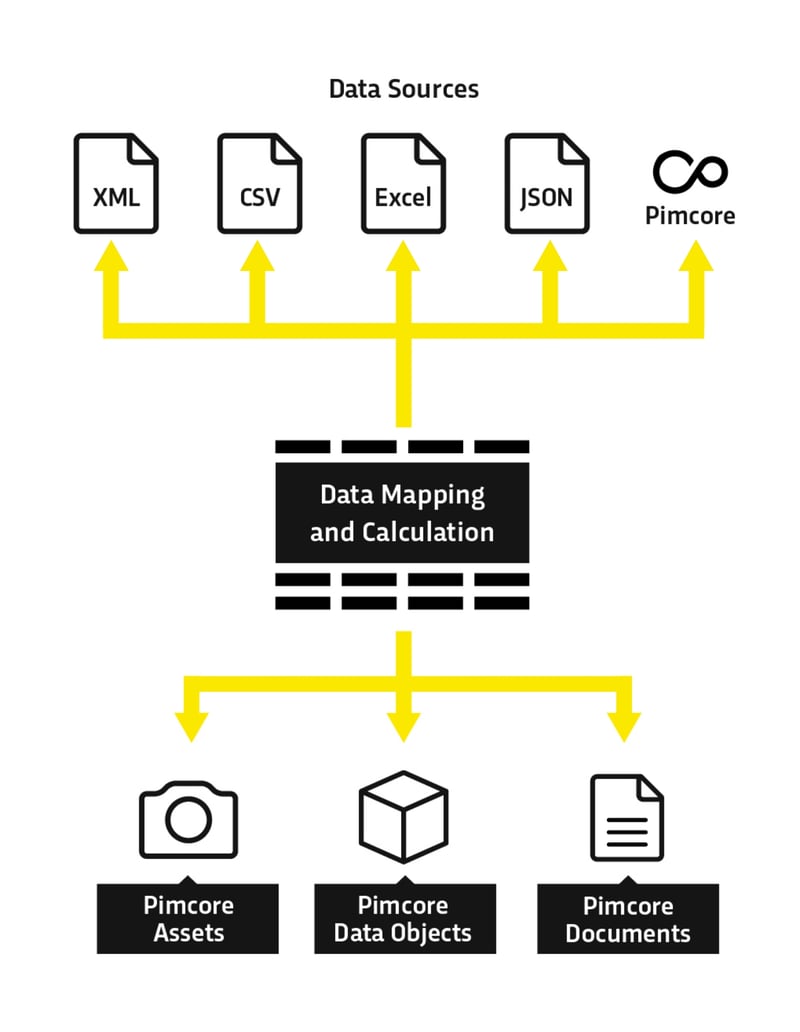
The Data Director reduces the effort for Pimcore interfaces to the essentials: Importing, mapping and importing data. All configurable via the Pimcore backend.
1
Parse & import source file
Intuitive interface selects fields from CSV/XML. Live preview. Import into staging table.
Sources: XML - JSON - CSV - Excel - BMEcat (XML format) - ZIP - Object Wizard - FTP/SFTP/S3 - SOAP - OAuth - PHP scripts - Pimcore reports
2
Attribute mapping via drag-and-drop
Assign raw data to Pimcore target fields via D&D. Key attributes for update logic. PHP callbacks optional.
Import modes: Create & Edit - Create only - Edit only
3
Generate export feeds & REST APIs
Create data feeds in XML/JSON/CSV/Excel or generate full REST APIs from the same interface.
Trigger response documents, success status, follow-up imports
4
Automation & pipelines
Time-controlled, event-based or via API call. Import pipelines for dependent import chains. CLI commands for server automation.
Notifications on completion or error
Range of functions

All Features at a Glance

Import sources

  • XML, JSON, CSV, Excel - from local files, monitored folders or URLs
  • BMEcat - files in the BMEcat standard are read and processed in XML format
  • Object Wizard - own Pimcore forms as initial data source: Users fill out a form whose data serves directly as the import basis
  • ZIP archives with embedded assets
  • FTP, FTPS, SFTP, AWS S3 + wildcard expressions
  • SOAP APIs via cURL
  • OAuth / token-based REST APIs
  • PHP scripts as import source
  • Pimcore reports as import source
  • Glob expressions & recursive directory search
  • Performance: Skip unchanged data records
  • Rewindable imports

Automation, pipelines & integrations

  • Import pipelines: chain dependent imports
  • CLI commands: data-director:extract/process/complete
  • Time-controlled (cron) or event-based
  • Automatic tests for import configurations
  • Deployment support (versionable)
  • Notifications (e-mail) on completion/error
  • Permissions (granular access control)
  • Integrations: Process Manager, FormBuilder, SEO Bundle
  • Object Preview, Quick Search, Path Formatter
  • POCL-compatible, available in the Pimcore Store

Translation & AI text generation

  • DeepL incl. glossaries, context parameters, exception lists
  • AWS Translate as an alternative
  • Rule-based AI text generation: Compose product texts from attribute values and placeholders
  • AI-supported AI text generation: Generate texts from attributes
  • Conversely: infer technical values from free text using AI
  • PHP callback functions for complex transformations
  • Virtual fields for intermediate values

Export, Data Query Selectors & API

  • Feeds in XML, JSON, CSV, Excel
  • Create REST APIs (read + write) incl. API keys
  • Data query selectors: cross-field queries via relations
  • Grid export from Pimcore grid configurations
  • Export templates + result document actions
  • Dataport configuration manageable via REST API
  • Generate single-page app / PWA responses
Typical use cases

What the Data Director is Used for

ERP connection SAP, Sage, Navision etc. time-controlled or event-based import  
Store synchronization Pimcore as PIM master → Shopware 6, BigCommerce, Shopify  
Marketplace feeds Amazon, Otto, Zalando, Google Shopping - automatically from Pimcore  
AI text generation Generate product descriptions from attributes or infer technical values from free text  
Automatic translation DeepL incl. glossaries in all language variants in one run  
Supplier data maintenance Price lists (Excel/CSV/XML/ZIP) with SKU/EAN matching  
SOAP & OAuth APIs Legacy systems and token-protected REST APIs via cURL chain  
Import Pipelines Categories → Products → Assets automatically in the correct order  
Data migration Legacy systems or Pimcore version migration with data transformation  
Mass processing Increase prices by 10%, adjust categories - without grid restrictions  
Asset automation Import product images from SFTP, assign to objects by file name  
REST API creation REST APIs for headless frontends, PWAs without in-house development  
Data Director vs. individual development

Why not Simply Develop Them Individually?

Individual interfaces are expensive, difficult to maintain and can often only be understood by the original developer.

The Data Director solves these problems structurally.

Individual development

Each new interface = separate development project with effort and costs

Maintenance requires the original developer

No standardized interface - every interface works differently

Troubleshooting requires code analysis, not configuration

Long time-to-market for new data sources

Black box for specialist users without programming knowledge

Blackbit Data Director

One-time investment - unlimited configurable data ports

Uniform interface for import, export, API

Business users configure simple imports themselves - without developers

Transparent error logs + rewindable imports

Integrate new data sources in hours instead of weeks

Actively maintained, POCL-compatible, available in the Pimcore Store

Test now free of charge

Test Blackbit Data Director for Pimcore for Free

Blackbit provides a complete demo installation. Request a login, watch video tutorials or test with your own data. The installation is reset every 24 hours.

FAQ

Answers for Pimcore Users

What is the Blackbit Data Director? Proprietary Pimcore plugin for import/export/API creation and workflow automation based on configuration - without in-depth programming. Proven in 100+ projects.
Can I use it without programming knowledge? Yes, basic functions are purely GUI-based. PHP callbacks optional for complex transformations.
Does the Data Director support AI text generation? Yes, rule-based and AI-supported. Generate texts from attributes or infer technical values from free text.
How can SOAP/OAuth APIs be connected? Via cURL chain in the import source field - multi-level auth flows without own connector development.
Is the Data Director POCL-compatible? Yes, available for Professional and Enterprise Edition in the Pimcore Store.
What are import pipelines? Link several dependent data ports to form a chain. Once an import is complete, the next one is started automatically.
How many data ports can I create? Unlimited - one-time license investment without additional costs per data port.
Can I trigger imports via CLI or REST API? Yes, CLI: data-director:extract/process/complete. Also via REST API call from external systems.
What happens if the mapping is incorrect? Rewindable imports: only reset affected fields for affected objects. No complete restore.
Are there any notifications after the import? Yes, notifications after completion or in the event of errors. Success status documents and error logs can be generated automatically.

Use Data Director in Your Own Pimcore?

Whether new installation, replacement of individual interfaces or expansion of an existing integration - Blackbit advises you on implementation and configuration.